Chome – thisisunsafe

If you are in Chrome and cannot proceed because of “Your connection is not private”, you can type “thisisunsafe” anywhere in the window (do not type it in the url input field). Then you can proceed.
Posted in Uncategorized | Leave a comment

Weird SQL DB error in my Grails code

I got the following error in my Grails app but Parameter 32 doesn’t make sense to me. Then I googled and found why. I copied the answer from stackoverflow.com.

Exception Message: The incoming tabular data stream (TDS) remote procedure call (RPC) protocol stream is incorrect. Parameter 32 (""): The supplied value is not a valid instance of data type datetime. 

“why I’m getting an error with the 12th parameter(When I only have 9 columns)” – A pyodbc .execute() statement is translated by the ODBC driver into an sp_prepexec call and sp_prepexec takes three (3) additional parameters (handleparams, and stmt) before the beginning of the bound parameters. 

– Gord ThompsonFeb 5, 2021 at 19:47

Posted in Uncategorized | Leave a comment

How to remove ^M from files in Linux

sed 's/\r//' input > output
Posted in Uncategorized | Leave a comment

How to migrate from Gitlab to Bitbucket

Follow these steps:

Create a new repo in bitbucket.

git clone [gitlabRepoUrl]
cd [repoName]

git branch -a
git checkout [each branch-name except HEAD]
git fetch --tags
git remote add bitbucket [bitbucketRepoUrl]
git remote set-url origin [bitbucketRepoUrl]
git push --all bitbucket
git push --tags bitbucket
Posted in Uncategorized | Leave a comment

How to fix access denied error for a folder

These are steps followed (https://softwarekeep.com/help-center/how-to-fix-the-failed-to-enumerate-objects-in-the-container-error-on-windows-10):

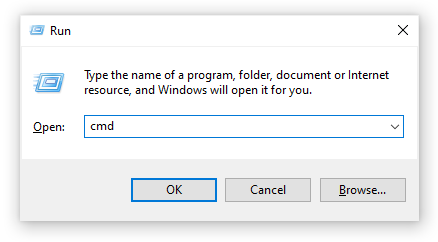
  1. Press the Windows + R keys on your keyboard to launch the Run utility. Type in “cmd” and  press Ctrl + Shift + Enter. This is going to open the Command Prompt with administrative permissions.
    command prompt
  2. If prompted, make sure to allow the Command Prompt to make changes on your device. This means that you might need an administrator account.
  3. Execute the following commands, pressing the Enter key in-between each command. Make sure to replace “FULL_PATH_HERE” with the path to your affected file or folder.
  • takeown /F X:\FULL_PATH_HERE
  • takeown /F X:\FULL_PATH_HERE /r /d y
  • icacls X:\FULL_PATH_HERE /grant Administrators:F
  • icacls X:\FULL_PATH_HERE /grant Administrators:F /t
  • Close the Command Prompt and try changing the permissions for the file or folder affected.
Posted in Uncategorized | Leave a comment

SQLite tool

https://marketplace.visualstudio.com/items?itemName=ErikEJ.SQLServerCompactSQLiteToolbox

Posted in Uncategorized | Leave a comment

Cannot send mail using crontab

Issued is like this one and I put comments under it:

https://stackoverflow.com/questions/42488101/python-script-not-executed-from-cron/72339239#72339239

The following is helpful but I haven’t tested it yet:

Cronjobs run in a minimal environment, so you can’t even assume that $PATH is set correctly. The script is probably failing to find the sendmail executable. Set $PATH explicitly in the crontab to something like this, or specify the full path to sendmail in the script.PATH=/usr/local/sbin:/usr/sbin:/s

Posted in Uncategorized | Leave a comment

How check crontab logs

cat /var/log/syslog |grep cron

Posted in Uncategorized | Leave a comment

How to check IIS Application Pool last restarted time

First find the process id of your w3wp.exe process in Task Manager. In my case it is 4004 and run this command in Powershell:

(Get-Process -Id 4004).StartTime

Posted in Uncategorized | Leave a comment

SQL Server database – Invalid column name “ClusterID”

If you get this error, you can try the following to make it disappear.

Posted in Uncategorized | Leave a comment